
INTRODUCING THE NEW ACHA 1Rink APP @ NATIONAL CHAMPIONSHIPS

KEEP UP TO DATE WITH THE LATEST INFO AND SCORES at the ACHA NATIONALS
GETTING STARTED with the ACHA APP
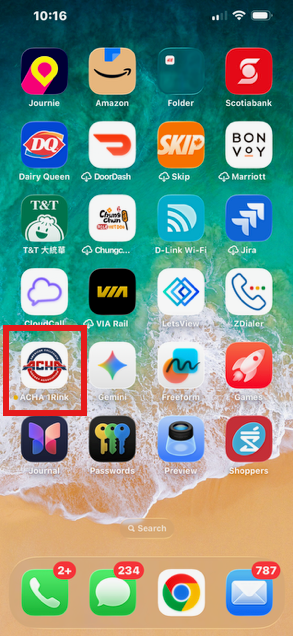
STEP 1. Download the app from App Store


Go to the Apple store or Google Play store depending on your device and search for ACHA 1Rink published by RinkNet Software.
Download the app and install it on your phone. If you do not have the app, you can use the generic web application from your browser at https://app.1rink.com
IMPORTANT: Please make sure you are downloading the ACHA 1Rink app, not the generic 1Rink app to get access to the feeds for ACHA.
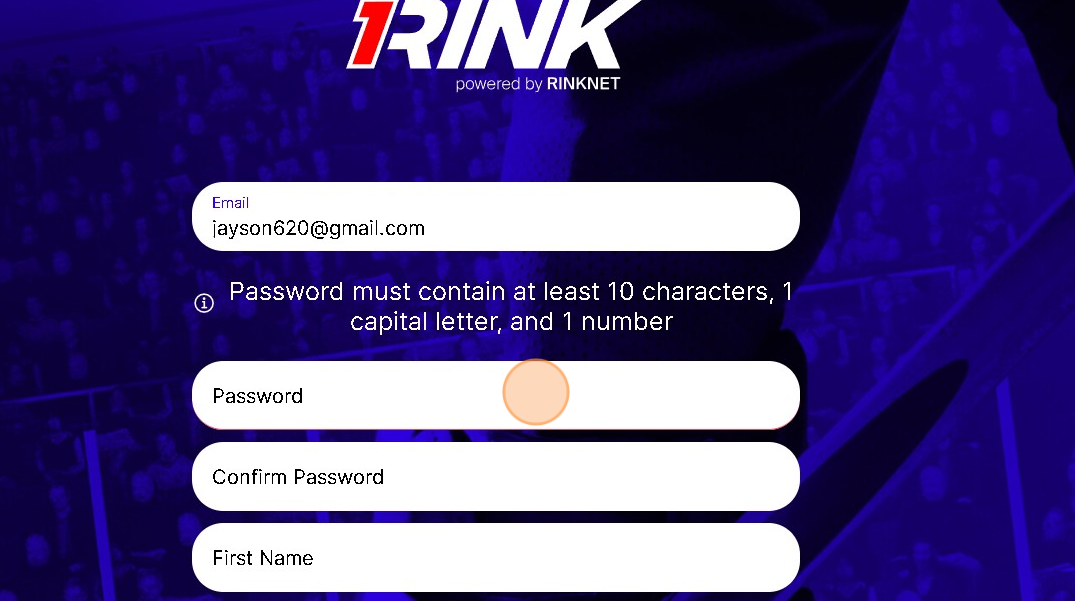
STEP 2. CREATE A 1Rink ACCOUNT
If you already registered a 1Rink account previously on the standard 1Rink app, you can skip this step.
Once installed, follow the instructions below to create a 1Rink account to login to the app.
Once your account is verified, it may have opened 1Rink in a web browser.
IMPORTANT: Once verified, open the ACHA 1Rink app on your phone and login.
STEP 3. VERIFICATION AND LOGIN
Once logged in, the first time you will be asked a series of questions, please select “Player” as your account type.
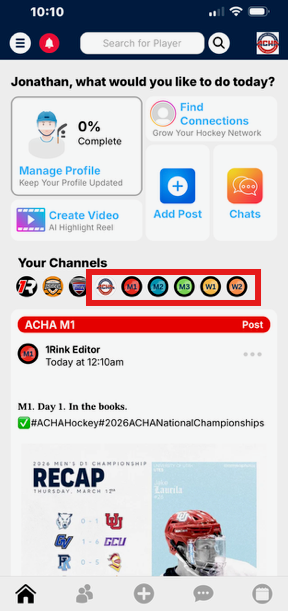
Once, logged in you should see the all the feeds related to the ACHA National Championships on March 12-22, 2026. You can select a channel from the channel list:
STEP 4. (OPTIONAL) UPDATE YOUR PLAYER PROFILE FOR SCOUTS
Keep your profile up to date, verify your team and stats, and post highlight videos in your profile. This ensures your profile is always up to date when scouts are searching for players in their RinkNet Scouting software.
Suggestions:
Update your profile description with your hockey goals
Verify your stats / teams